

A strong speaker media kit helps event organizers, podcast hosts, summit producers, and brand partners quickly decide whether you are the right fit. Instead of sending a different bio, photo, and link every time someone asks, you provide a polished set of approved materials that clearly communicates your expertise, credibility, and availability.
Thank you Maia, Tomeaka Fladger, and many others for tuning into my live video! Join me for my next live video in the app.
The most useful media kits make it easy to answer a few essential questions: Who are you? What do you speak about? What results or experience support your authority? And how can someone book you?
What is a speaker media kit?
A speaker media kit is a collection of brand and booking resources for people who may want to feature you. It can live on a dedicated page of your website, with a downloadable speaker one sheet for easy sharing.
It is useful for more than conference keynotes. Create one if you want to be considered for:
Podcast guest appearances
Virtual summits and online events
Panels, workshops, and webinars
Corporate speaking opportunities
Media interviews and expert commentary
Brand partnerships and collaborations
Think of it as a practical decision-making tool. A busy organizer should be able to scan it, find approved assets, understand your strongest topics, and contact you without a long email exchange.
The 7 essential parts of a speaker media kit
Every kit does not need to look identical, but these seven components create a complete, professional foundation.
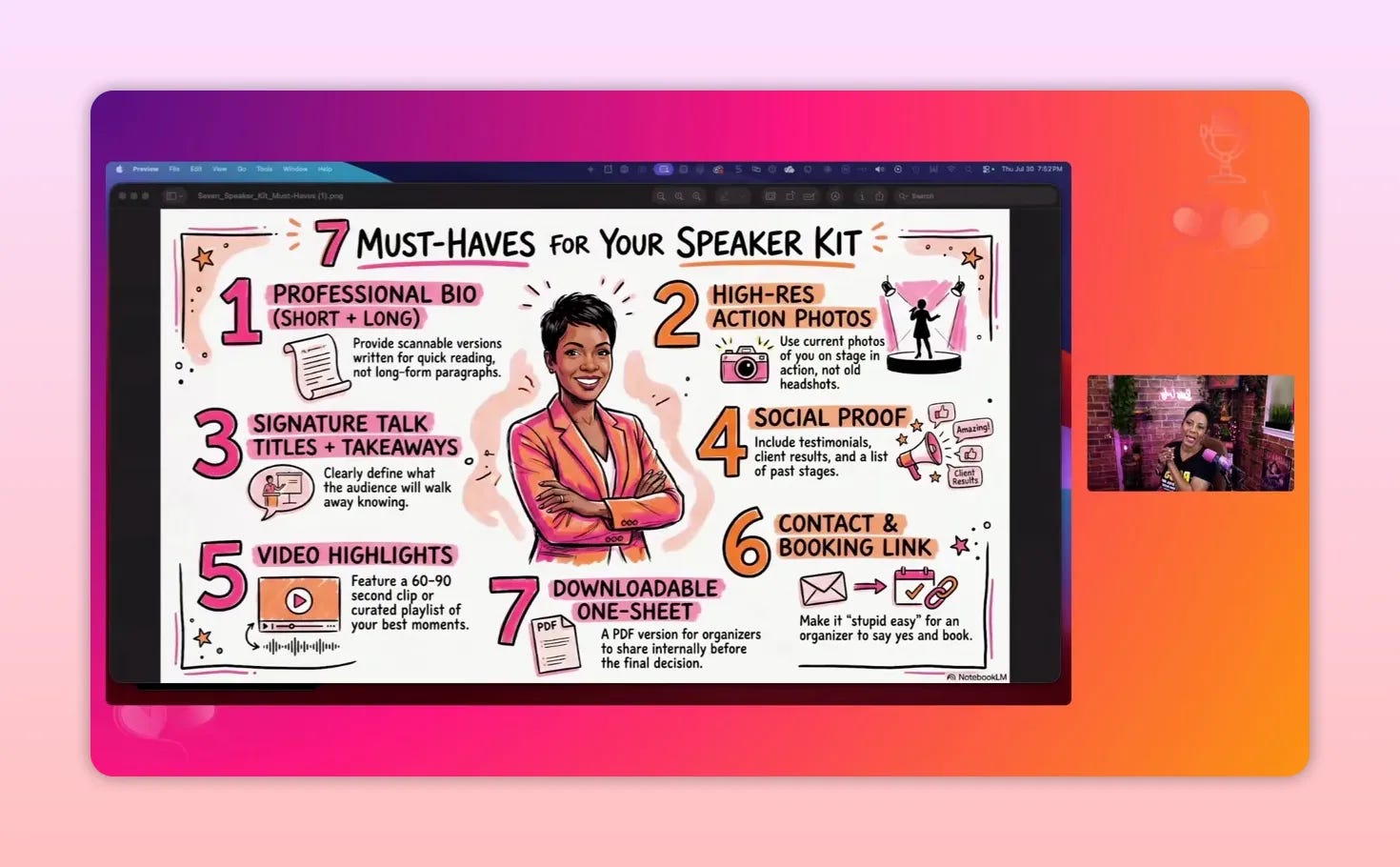
1. Professional bios in multiple lengths
One long biography is not enough. Hosts and organizers use your information in different places, from a brief introduction to a conference program or press feature. Prepare several versions in advance so that your message stays accurate and consistent.
Short bio, about 50 words: Best for spoken introductions, podcast guest pages, and brief event listings.
Medium bio, about 100 words: Useful for conference programs, event pages, and guest profiles.
Long bio, about 300 words: Appropriate for your media kit, speaking page, or press materials.
Each version should explain your role, the people you serve, the problem you help solve, and the experience that makes you credible. The medium and long versions can include a small personal detail if it helps people understand you as a well-rounded person, not merely a list of credentials.
Keep bios scannable. Use short paragraphs rather than a dense wall of text. An organizer should be able to lift the approved version they need without heavily editing it.
2. High-resolution headshots and action photos
Make it simple for others to promote you accurately. Include a selection of current, high-resolution images that work across websites, social graphics, newsletters, and event programs.
A useful photo library includes:
A close headshot
A waist-up portrait
A full-body image
Action photos of you speaking, teaching, or leading a session when available
Authentic professional photography is especially valuable for a speaker brand. While AI-generated images can be useful in a limited situation, real photographs better represent how you show up and help establish trust. If you do not yet have stage photos, begin with a strong portrait session or use good natural lighting and a capable phone camera to create solid starting images.
3. Signature talk titles and audience takeaways
Your media kit should make your areas of expertise unmistakable. Rather than trying to create a new topic for every invitation, develop a focused library of talks that reflect what you genuinely know, enjoy, and want to be known for.
A practical starting point is at least three signature talks. For each one, include:
A clear, audience-relevant title
A short description of the session
The ideal audience or best-fit event type
A short list of concrete takeaways
For example, a talk entry might be structured like this:
Title: Build Digital Authority in a Crowded Market
Best for: Professionals and business owners who need clearer online positioning
Overview: A practical session on clarifying expertise and building recognizable branded assets.
Takeaways: A stronger authority statement, a clearer content focus, and an asset plan that supports visibility.
This approach prevents a common mistake: force-fitting yourself into a topic that does not align with your real expertise just to secure a spot. A mismatched topic can make your presentation feel inauthentic and may attract the wrong audience. Clear signature talks help you assess fit and recommend the best option with confidence.
4. Social proof and credibility markers
Social proof gives decision-makers evidence that others have benefited from your work. Include only proof that is real, specific, and relevant to the type of opportunities you want.
Possible social-proof assets include:
Client or attendee testimonials
Written or video case studies
Past events, podcasts, or stages
Relevant certifications, training, and education
Awards, recognition, or notable features
Examples of outcomes or impact from your work
Do not bury your proof in a lengthy biography. Create a visible credibility section that lets organizers quickly understand your background and the experience others have had working with you.
5. Video highlights or a speaking playlist
People booking a guest or speaker often want to see how you communicate. A short highlight reel, embedded playlist, or selected appearances can help them assess your style and determine whether you fit their audience.
If you do not have a large library of event footage, start small. Record a 60 to 90 second video explaining the work you care about and why your subject area matters. A clear phone-recorded clip is enough to begin building a usable video asset.
If you already have interviews, livestreams, panels, or podcast appearances online, curate them into a dedicated playlist. That playlist becomes a convenient speaking portfolio, even if the clips were not recorded from a physical stage.
6. Clear contact and booking details
A media kit fails if someone likes what they see but cannot figure out what to do next. Add clear contact options in more than one location on the page and in the downloadable file.
Email link
Phone or messaging contact, where appropriate
Booking calendar
Speaking inquiry form
Link to your main speaking page
A booking conversation is also a chance to confirm alignment. Before accepting an appearance, understand the purpose of the event, the host’s expectations, and whether the opportunity fits your values and brand. Being featured can build credibility, but every association also becomes part of your public positioning.
7. A downloadable speaker one sheet
A speaker one sheet is a concise, branded PDF that gives organizers a shareable version of your key information. It is especially useful when an organizer needs to send your details to a committee, client, or selection panel.
Unlike a full media-kit page, a one sheet should be designed for fast review. Include:
Your name and authority statement
A professional photo
Your primary speaking topics or keynotes
A short testimonial or credibility highlight
Your contact and booking details
Links to your speaking page and email or calendar
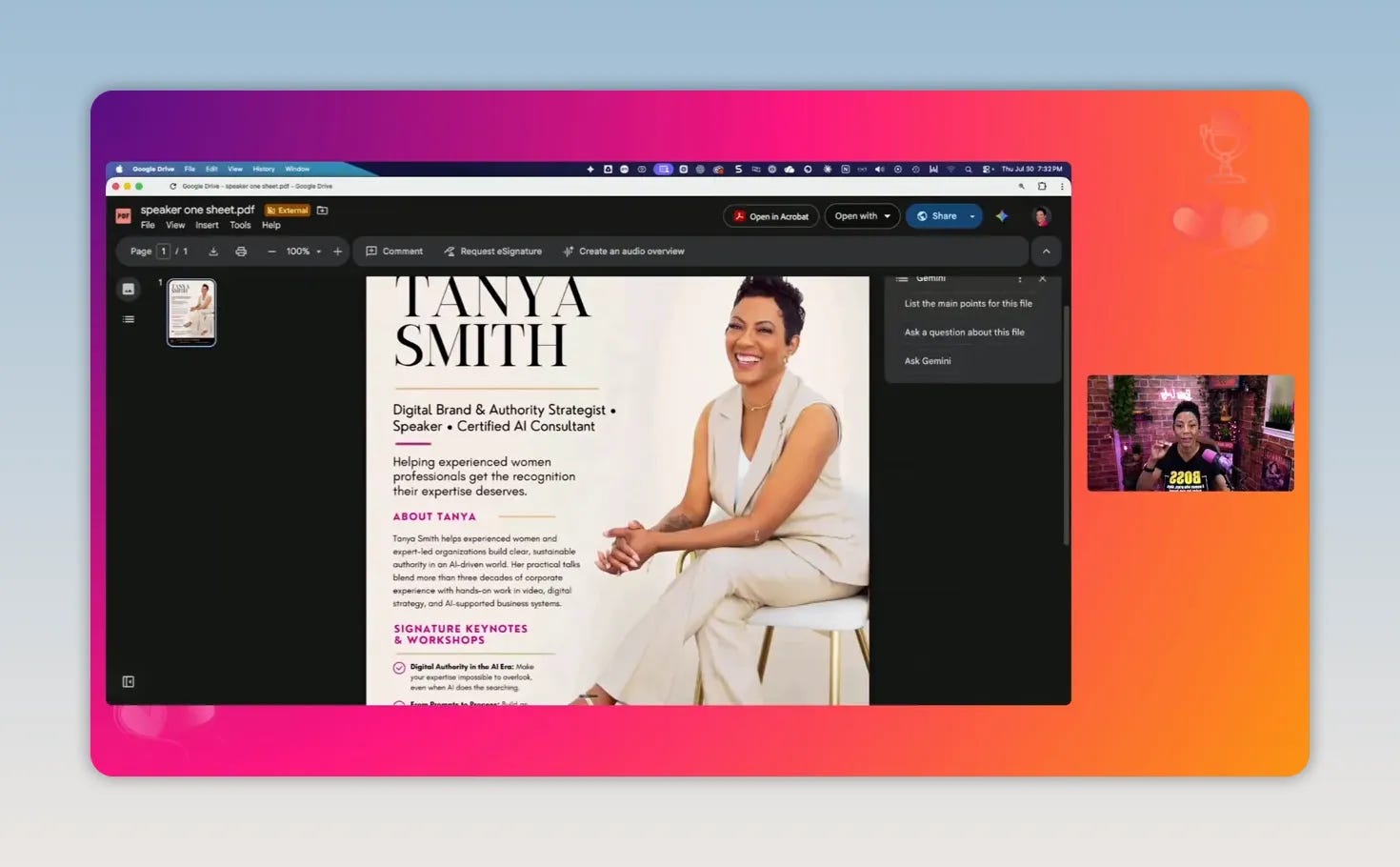
Your one sheet should match the overall look of your website and media kit. Consistent photos, fonts, colors, and tone make the materials feel intentional and recognizable.
Why a brand guide belongs alongside your media kit
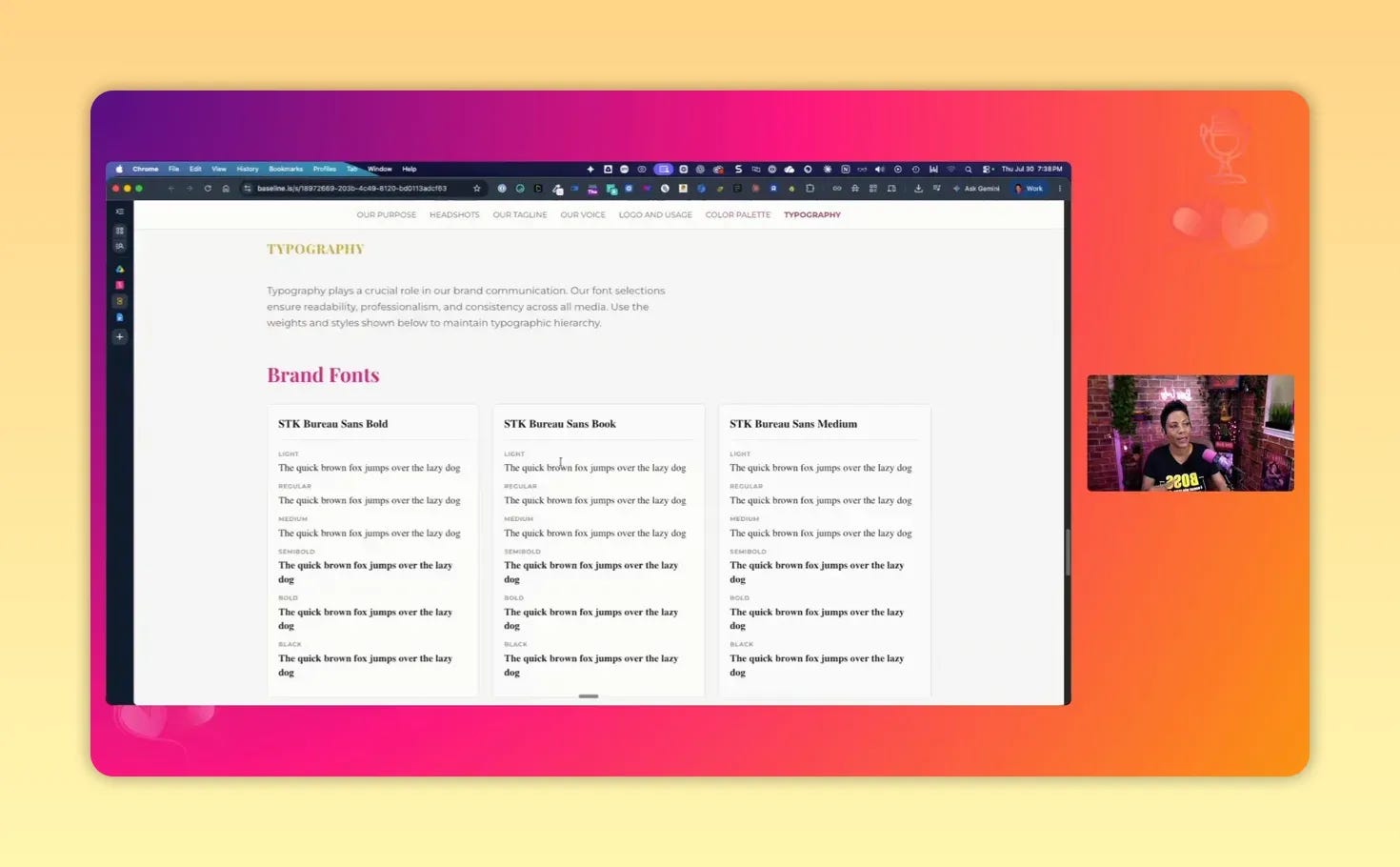
A brand guide is an optional but highly practical addition, particularly if other people regularly create promotional graphics for you. It gives hosts, collaborators, and team members the information they need to represent your brand accurately.
A simple guide can include:
Approved logos and logo-use guidance
Brand colors and hex codes
Primary fonts and typography choices
Approved headshots and image options
Short brand descriptors or positioning notes
You can build a basic guide with a design platform such as Canva, or use a dedicated brand-management tool. The goal is not rigid perfection. It is to prevent guesswork when someone is designing event graphics, social posts, or other materials that feature you.
How to make your speaker media kit easy to use
Content matters, but accessibility matters just as much. Arrange your assets so someone can find what they need in a few clicks.
Create a dedicated speaking page
A dedicated page on your website provides a professional home for your talks, proof, videos, approved bios, and contact information. Add a visible call to action such as “Invite Me to Speak” or “Request a Speaking Conversation.”
Include a separate media-resources section where organizers can quickly access your bios, host introduction, photos, one sheet, and brand assets.
Use approved, downloadable files
Provide clearly named files that can be downloaded without confusion. Examples include:
Firstname-Lastname-50-Word-Bio
Firstname-Lastname-Headshot
Firstname-Lastname-Speaker-One-Sheet
Firstname-Lastname-Brand-Guide
This reduces back-and-forth and gives partners confidence that they are using the current, approved version.
Refresh the kit as your brand evolves
A media kit is not a one-time project. Update it when your expertise changes, your positioning becomes clearer, you gain new testimonials, or your photos no longer reflect how you currently show up.
Review the following at least periodically:
Bio language and authority statement
Headshots and action photos
Signature talk titles and descriptions
Testimonials and featured appearances
Contact links and calendar availability
One-sheet design and downloadable resources
Common speaker media kit mistakes to avoid
Using only one biography
A one-size-fits-all bio forces hosts to edit your story themselves. Give them short, medium, and long versions to protect the clarity of your positioning.
Making every opportunity fit
Not every event is the right event. Avoid inventing a topic just because an invitation sounds appealing. Choose opportunities and topics that match your expertise, desired audience, and brand values.
Relying on low-quality or outdated photos
Event organizers need images that look professional across different formats. Invest in current photos and make them easy to download.
Listing topics without outcomes
A title alone does not explain the value of a session. Include takeaways that show what the audience will understand, do, or leave with.
Forgetting the booking path
Do not make someone search for an email address or send a vague social-media message. Put your preferred inquiry method directly in the media kit and one sheet.
Being so consistent that the brand becomes lifeless
Consistency helps people recognize and trust your brand, but it does not require every presentation or graphic to look identical. Leave room for creativity and experimentation while maintaining recognizable elements such as your visual style, logo, colors, voice, or point of view.
Speaker media kit checklist
Before sharing your kit, confirm that it contains the essentials:
Three bio lengths: short, medium, and long
Current photos: headshots plus action images where possible
Three or more signature talks: titles, descriptions, best fit, and takeaways
Social proof: testimonials, credentials, appearances, and results
Video proof: a highlight clip or curated speaking playlist
Easy booking: an email, form, calendar, or direct inquiry method
Downloadable one sheet: branded, concise, and easy to share
Final takeaway
A speaker media kit is not just a collection of files. It is an authority asset that helps the right people understand your expertise, see evidence of your work, and take the next step to book you. Build it around clarity, credible proof, useful visuals, and a simple contact path. Then keep it current as your work and reputation grow.

Your Guide: Tanya Smith is a digital branding strategist who helps experienced professionals turn earned expertise into a trusted presence people can find, trust, and hire. Off the clock, she’s a wife, a soon-to-be empty nester, and mom to two daughters, plus one very mischievous Shih-Poo named Koda.


